It’s no secret that WhatsApp has become one of the most important parts of communication. However, its popularity means scammers and con artists also run random scams. So, if you are someone who wants to silence unknown callers on WhatsApp, you can easily do so.
Also See: 5 Signs Your WhatsApp Might Be Hacked
What is Silence Unknown Callers on WhatsApp?
The good thing is that WhatsApp now comes with a built-in security feature for this task. Aptly named, Silence Unknown Callers, it automatically mutes incoming calls from unknown numbers.

When enabled, spam or unknown numbers will show under the Calls tab and notifications. So yeah, no loud rings. The good thing is that since it is not an outright block, you can still see the caller’s name. On the downside, unknown users will still be able to send you WhatsApp messages.
How to Silence Unknown Callers on WhatsApp
Before we get started, let me tell you that this setting is very easy to find once you know where to look. Here is how to do it, step by step.
Step 1: Open WhatsApp and tap the three-dot menu in the top-right corner (on Android). If you have an iPhone, head over to Settings directly from the bottom bar.
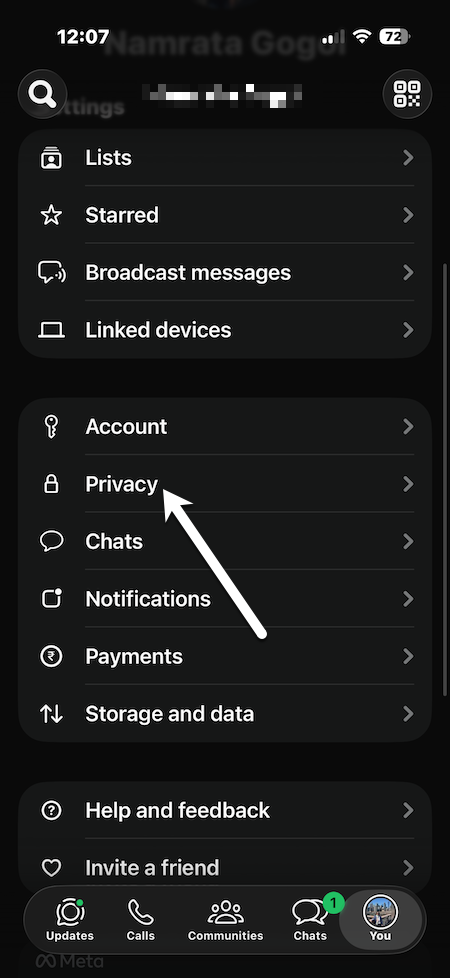
Step 2: Now, tap on Privacy, scroll down, and search for the Calls section.
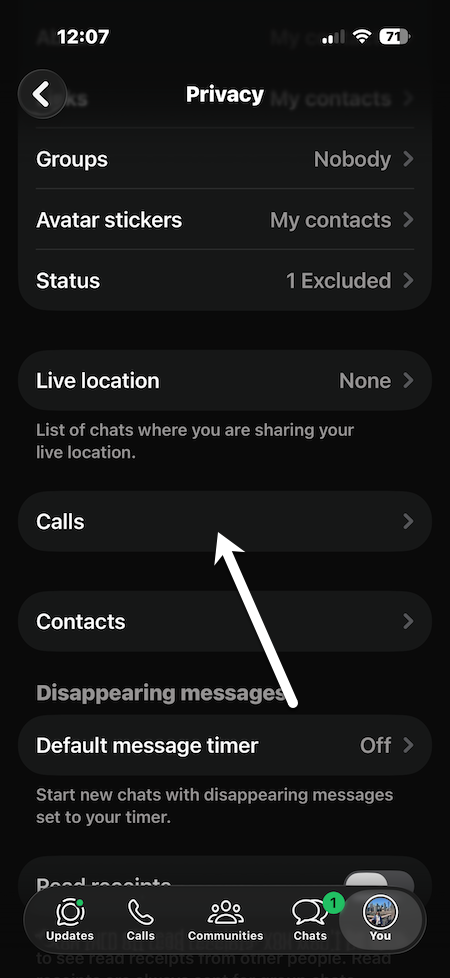
Step 4: Now, all you need to do is toggle the switch for Silence Unknown Callers.
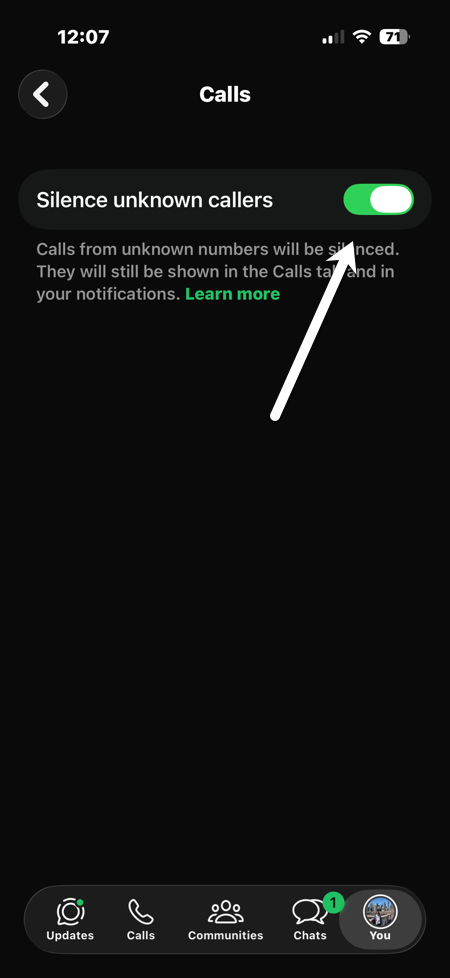
As soon as you have turned this feature on, any incoming WhatsApp call from a number not saved in your phone’s contact list will be silenced by default. The call will still appear in your call history so you can review it afterwards.
Can You Completely Block Unknown Numbers on WhatsApp?
At this moment, no feature in WhatsApp stops all unknown callers by default. Aforementioned, the Silence Unknown Callers feature really rejects the calls. It just mutes them.
If you really want to stop a person from reaching out through calls and messages entirely, the best alternative for them is manually blocking that number inside the app itself.
While that does silence these unknown callers on WhatsApp and stops them from ringing you, they still show up in the call history.
FAQs
What happens if I turn on silence unknown callers?
The Silence Unknown Callers feature mutes unsaved numbers from calling you on WhatsApp.
Does silencing unknown callers on WhatsApp block them permanently?
No, Silence Unknown Callers only silences the call. The number is not blocked.
Is the Silence Unknown Callers feature available on Android and iPhone?
Yes, this Silence Unknown Callers feature is available for both Android and iPhone WhatsApp.
Will I miss important calls if I turn on Silence Unknown Callers?
Not really. Calls are still logged in your call history, even with the Silence Unknown Callers feature on (so you can look them up later).