Instagram is where many of our conversations live. From casual day-to-day chats with friends to important memories, our DMs often hold more value than we realize. So when a message gets deleted by mistake, it’s normal to panic. And if you have ever wondered whether it’s possible to recover deleted Instagram messages, you are definitely not alone.
So in this post, we’ll look at Instagram message recovery and how you can still find a record of deleted messages using Instagram’s official tools. We’ll also clear up some common confusion along the way.
Also See: 6 Best Apps and Online Tools to Create Instagram Carousels
Can You Actually Recover Deleted Instagram Messages?
The answer is yes, but there are some limits.
Instagram does not usually allow messages that have been deleted from inboxes to be recovered. Once a message is deleted, you won’t be able to recover the Instagram chat magically. However, Instagram does store your account’s data, including message history, on its server.

By requesting a download of your account data, you can also access a copy of your messages, even ones that you deleted from the app.
So, while you can’t undo the deletion in Instagram but you can still read the conversation through a downloaded file.
Also See: How to Repost Instagram Stories in Your Story
How Instagram‘s Data Download Feature Helps
Instagram has a built-in feature called Download Your Information. It allows you to request a copy of your data, such as messages, photos, comments, and more. When you try to Instagram message recovery, Instagram prepares a file that contains your conversion history in a readable format.
It is very beneficial if you’re trying to find an old message, confirm details from a past chat, or recover text that got deleted accidentally.
How to Download Deleted Instagram Messages
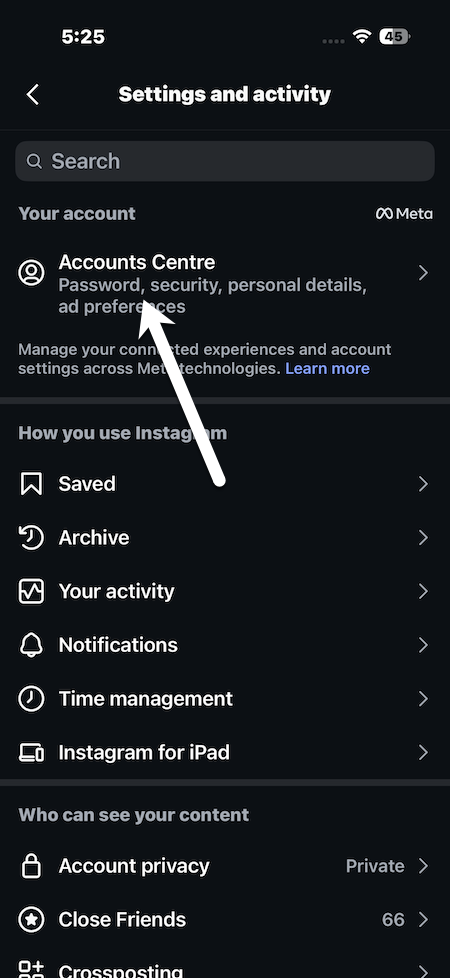
Step 1: Open the Instagram app and go to your profile. Next, tap the menu icon in the top right corner and head to Account Center.
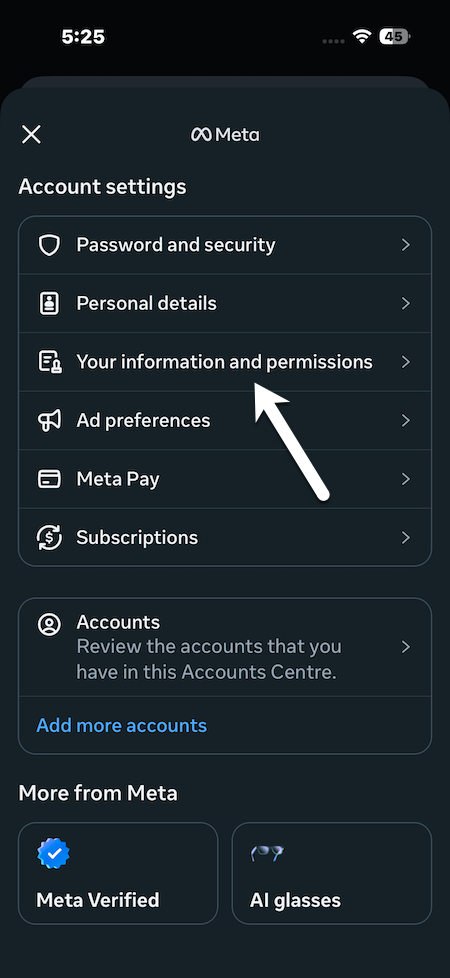
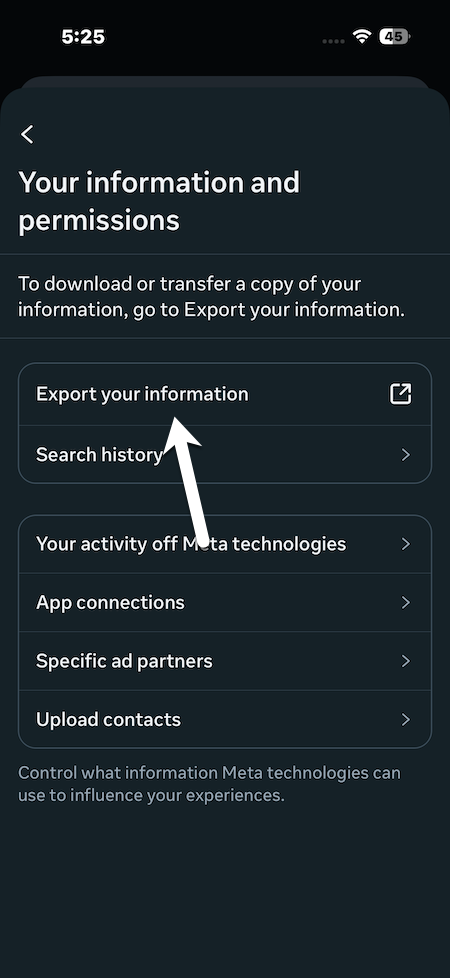
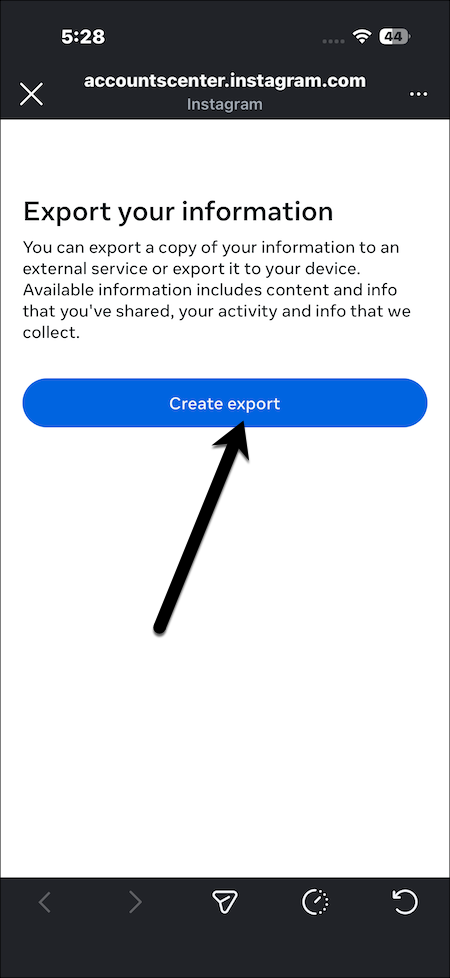
Step 2: Next, scroll down and select Accounts > Your information and permissions, then tap Export your information.
Instagram will ask you whether you want to download all your data or only specific parts. You have to choose some of your information.
Step 3: Now, scroll down and select Message. Tap Next, then choose Download to device.
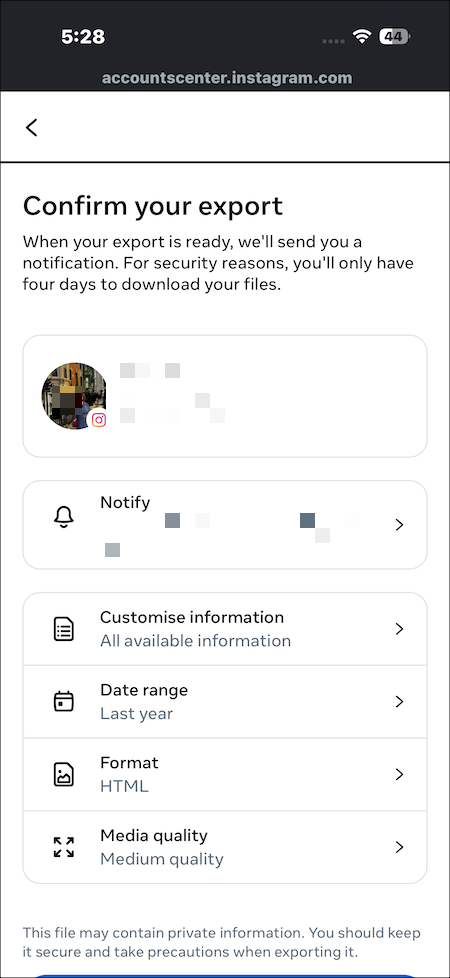
You will now be asked to customize the download. Select the date range that includes the conversation you are looking for. You can also choose media quality.
If you want a faster download and a smaller file, low quality also works fine. But if the deleted message includes photos or videos, then it is better to keep the media quality set to high.
Step 4: Once you are done, tap Create Files. That’s it!
Also See: Top 6 Tips and Tricks to Create Engaging Reels in Instagram
Accessing the Messages
Instagram will take time to prepare your request. When it’s ready, you’ll receive both an email and an in-app notification. Download the zip file to your device and unzip it using your file manager.
Inside the folder, you need to look for the message section. Open a conversational file, and you will be able to read the full chat history, including the messages that were previously deleted from the app.
Final Thoughts
Deleting an Instagram message does not necessarily mean it is permanently gone. Also, Instagram does not provide a way to restore deleted messages. However, Instagram’s data download feature gives a good option to recover the history of your direct messages. It is a simple and official method that doesn’t put your account at risk.
Instead of depending on unsafe third-party apps, this approach keeps your data secure and gives you peace of mind. Sometimes, knowing where to look makes all the difference.
Recover Deleted Instagram Messages FAQs
How can I retrieve deleted Instagram DMs?
To retrieve deleted Instagram DMs, you can request your data download from Meta.
Can deleted messages be recovered from the other person’s chat?
Yes, deleted messages can be recovered from the other person’s chat.
How long do deleted Instagram messages stay recoverable?
Instagram messages are recoverable only until you download your data.