We all have, at one point or another, used AI chatbots like Claude, ChatGPT, and Perplexity to brainstorm ideas, review code, summarize documents, or simply to draft work emails. However, the recent news about Claude chats being exposed in Google and Bing searches has raised serious privacy concerns. Thankfully, there are ways to prevent your Claude chats from becoming public.
However, before we get to it, we must understand that not all Claude chats have gone public. The incident wasn’t caused by hackers or a data breach. Only some publicly shared Claude conversations had appeared in Google and Bing search results. That being said, it highlighted something many people overlook – how you share your Claude chats.
Understand What “Share” Actually Means
The good news is that your regular Claude conversations remain private by default. The issue only affected chats that users deliberately shared through Claude’s public sharing feature.
Here’s how to keep your Claude conversations private and use AI more safely.
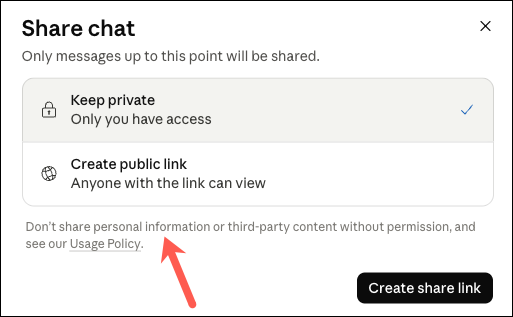
Most of us, at some point or the other, assumed that generating a share link worked like sending a private document to a colleague. However, in reality, the feature creates a publicly accessible webpage that anyone with the link can view. If that page is discovered by search engines or linked elsewhere on the web, it may eventually become searchable.
So if you are not comfortable with the idea of anyone outside your organization reading the AI chatbot conversation, then don’t create a public link.
Review Your Shared Chats Regularly
If you’ve regularly created publicly accessible Claude chats for months, there’s a good chance you’ve forgotten some of the conversations you’ve shared.
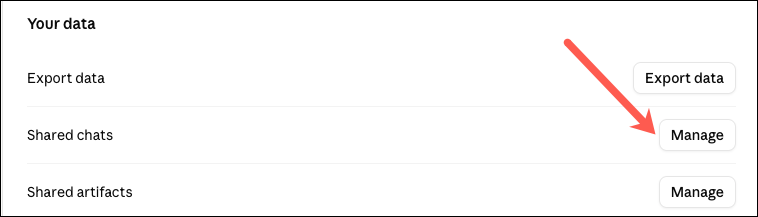
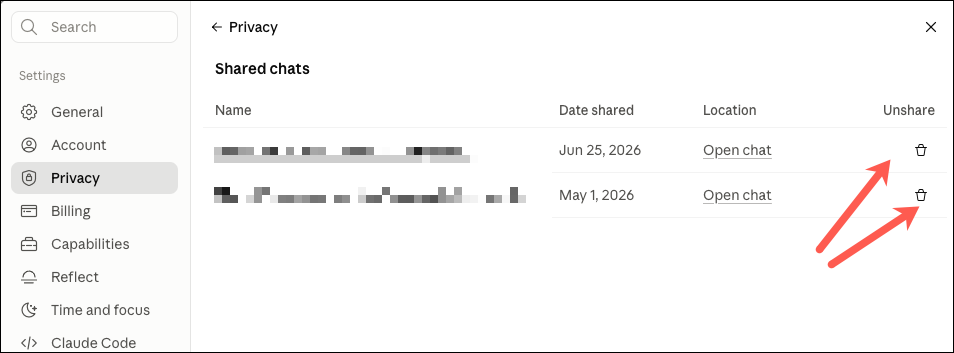
To see Claude’s shared chats, open Settings > Privacy > Shared Chats and review every active public link.
Next, click on the Unshare icon. Once a link is disabled, new visitors won’t be able to access it, although anyone who previously saved the content may still have a copy.
Making this a monthly habit is one of the easiest ways to reduce your privacy risk.
Avoid Sharing Confidential Information
We all know that Claude, ChatGPT, Gemini, and other AI assistants are excellent productivity tools. But. They are not secure document vaults. As such, you should avoid sharing information such as passwords and recovery codes, copies of financial records, or customer databases.
At the same time, you should refrain from publicly sharing ideas and strategies regarding under-production ideas and products.
Many of the conversations reportedly found in search results included resumes, API credentials, business documents, and other sensitive material that should never have been shared publicly.
Remove Identifying Details Before Asking for Help
At the time when you genuinely need AI assistance with work or with your persinal life, I’d recommend to remove the identifying details. For instance, you can replace company names with placeholders if you are reviweing original client proposal or copy only the specific clause you need help understanding.
A few minutes spent removing sensitive details can significantly reduce your exposure while still giving Claude enough context to provide useful answers.
Privacy Starts With Better Habits
The recent Claude incident was a reminder that privacy often depends on understanding the fine line of how AI chatbots work. Public links are designed to be accessible, and search engines are designed to discover public content. Those two systems inevitably intersect.
Following these habits won’t just protect your Claude conversations. They’ll make you a smarter and safer AI user across every platform.