Microsoft recently released a new Windows update on January 13, 2026. Reportedly, several Windows 11 PC are failing to boot after the installation of the security update known as “KB5074109.”
As per Microsoft, they are investigating how this issue came up and have assured users that those who have updated their PCs need not panic, as the issue is limited to only some PCs.
See Also: How to Fix Microsoft Teams Screen Sharing Not Working on Windows
Windows Update Details
The update, which targets the Windows 11 versions, 24H2 (OS build 26100.7623) and 25H2 (OS build 26200.7623), was supposed to fix over 100 security vulnerabilities but ended up triggering “UNMOUNTABLE_BOOT_VOLUME” Blue Screen of Death (BSOD) error on some PCs.
Other than that, the affected systems display a black screen with the message, “Your device ran into a problem and needs a restart.” And this results in users stuck in a boot loop.
So far, no virtual machines have reported the issue, suggesting hardware-specific limitations, possibly related to storage drives or BIOS configurations.
Microsoft’s Response
Microsoft has acknowledged the problem and is probing whether the update caused the regression. The company has urged the affected users to submit diagnostics via the Feedback Hub for better analysis of the situation.
This update follows two out-of-band patches (KB5077744 and KB5078127) for fixing unrelated January bugs like Outlook freezes and File Explorer issues, but neither of them fixes boot failures.
See Also: 5 Best Laptops for Students Under INR 35,000
Affected Users and Scope
So far, the issue appears to affect only a limited number of PCs. There is no indication that all users who install the update will face the same problem. As such, there has been frustration among users, and many of them have already uninstalled the new update, and waiting for Microsoft’s response regarding the issue.
Workarounds Around the Windows 11 January 2026 Update
First of all, to recover, you will need to boot into Windows Recovery Environment (WinRE) via repeated restarts or installation media.
Select Troubleshoot > Advanced options > Uninstall Updates > Uninstall latest quality update” targeting KB5074109.
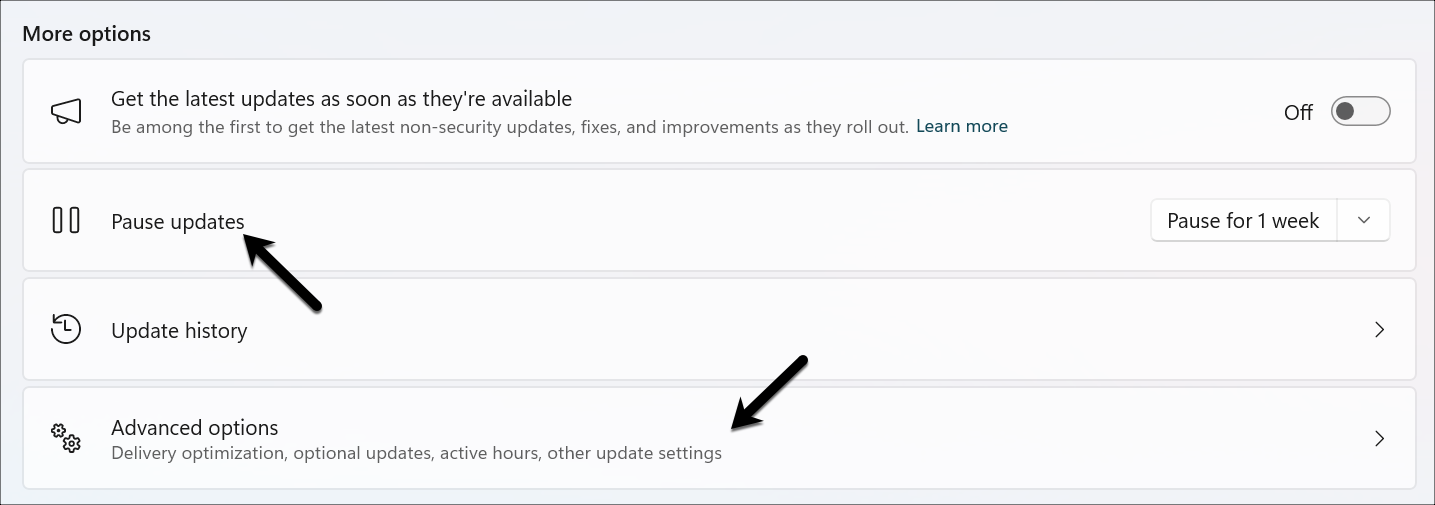
Then, for the post-recovery, pause Windows Updates in Settings to block reinstallation. Alternatively, you can hide the KB via Command Prompt,
wusa /uninstall /kb:5074109
Microsoft advises that users not manually install until the issue is resolved.
See Also: Intel Core Ultra Series 3: Panther Lake Powers CES 2026’s AI Revolution
Broader Context
The January 2026 patch has been controversial for Windows 11, leading to issues such as sleep mode failures (S3), Citrix glitches, and Remote Desktop credential prompts.
Some critics are highlighting Microsoft’s rushed security rollouts, indicating towards past debacles like the 2020 PrintNightmare issue or 2023 BitLocker Bugs.
Although a fix is anticipated soon, users should continue monitoring official channels. For now, the incident underscores backing up before major updates are announced.
Windows 11 January 2026 Update: FAQs
What is the Windows 11 January 2026 update (KB5074109)?
The Windows 11 January 2026 update (KB5074109) is a cumulative monthly update that focused on fixing over 100 security vulnerabilities.
Why you should not update Windows 11 in January 2026
It is reported that several PCs are facing errors after the new update.
Can KB5074109 be uninstalled if already installed?
Yes, you can uninstall it, but Microsoft suggests not uninstalling until the updates are fixed.