Ask any social media manager what format is dominating Instagram right now, and the answer is the same – carousels. Not Reels or static images.
And this is why here is the complete Instagram carousel guide to help you make the most of them in 2026.
Why Carousels Are Winning in 2026
The numbers are hard to argue with. Buffer’s analysis of Instagram content found that carousels generate 12% more engagement than Reels and 114% more than single-image posts. On top of that, they earn more saves than static photos, making them the most algorithmically valuable format for sustained organic reach.
There is also a second stance that no other format gets. If someone scrolls past your carousel without swiping, Instagram will re-serve it later – sometimes with a different slide as the preview. Every swipe a user makes is a signal to the algorithm that your content is worth distributing further.
How to Create an Instagram Carousel Post
Step 1: Tap the + icon, select Post, then tap the multiple-selection icon in your gallery.
Step 2: Pick 2 to 20 images or videos in order, edit slides individually, write your caption, and post.
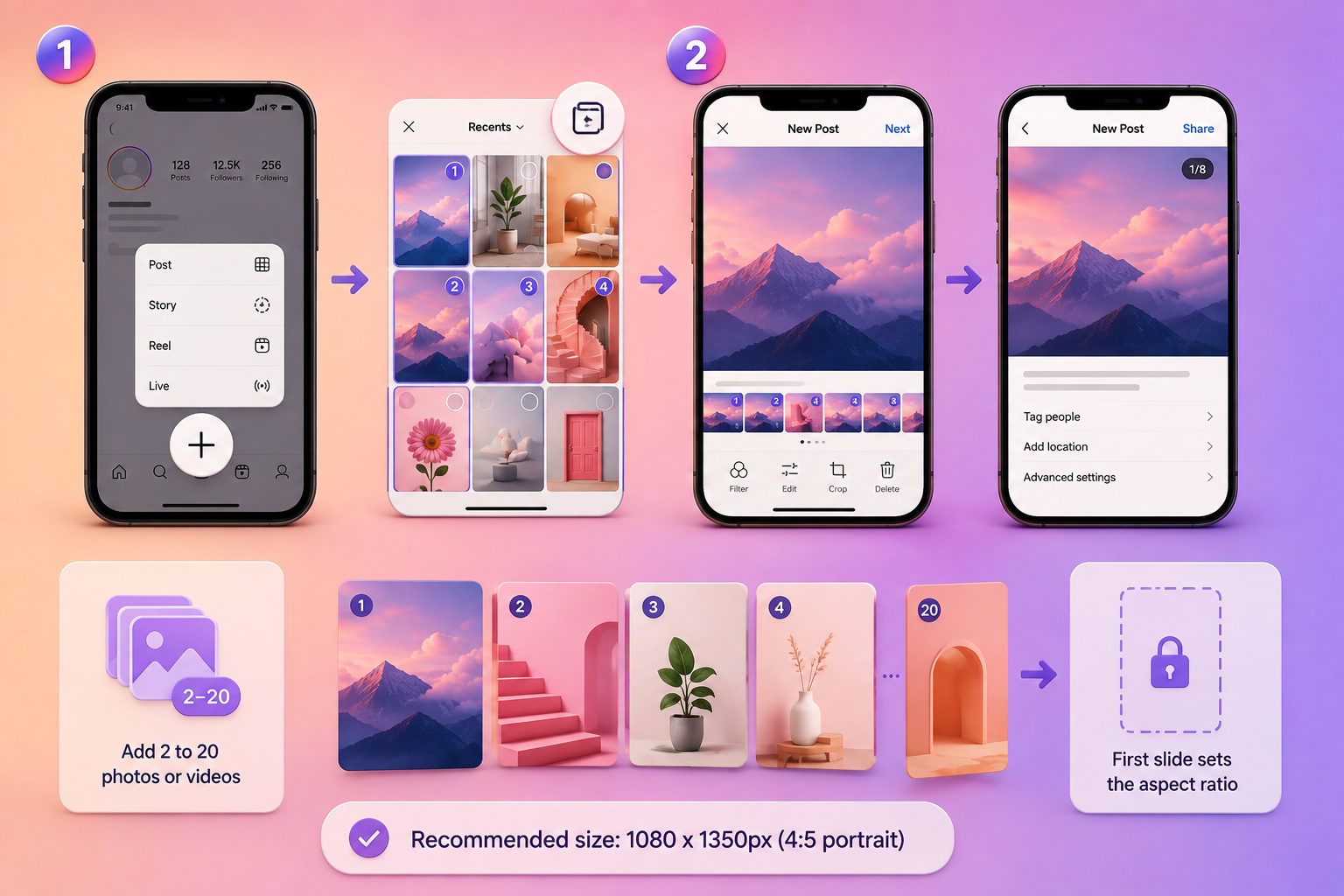
Do note that the aspect ratio of your first slide locks all subsequent slides – you cannot mix sizes. Recommended size for an Instagram carousel post is 1080 x 1350px (4:5 portrait).
Instagram Carousel Tips That Really Work
Your cover slide has one job – earn the swipe. Keep the headline under eight to ten words, make the value immediately clear, and avoid anything vague. Instead of the basic Productivity Tips, try a catchy headline like 5 shifts that saved me 10 hours a week.

Aim for 8-10 slides. Data from SocialInsider points to more than 10 slides as the sweet spot for engagement. For deeper educational content or guides, going up to 12-15 slides is fine. Under five slides, and you are leaving dwell time on the table.
Make the carousels like a story. The goal is to make each slide pull the viewer to swipe to the next. Build a little tension, deliver value progressively, and make the last slide impossible to ignore. A carousel that people read to the end drives completion rate – one of the highest-value signals in the current algorithm.
End with a clear CTA. Saves and DM shares are worth far more than likes right now. Close your carousel with a direct ask – “Save this for later,” “Send this to someone who needs it,” or a question that invites a comment. Do not leave slide ten blank.
Instagram Carousel Ideas That Perform
Not sure what to post? Step-by-step tutorials (one step per slide) consistently earn saves. Before-and-after posts drive shares. Myth vs. fact carousels generate comments. Numbered listicles – “7 things to stop doing on Instagram” – get people swiping to find the one that applies to them. Any format where each slide earns the next swipe is worth trying.
Read More: https://sparknherd.com/how-to/unarchive-a-story-on-instagram/
In A Nutshell
Hook on slide one, build toward a payoff, end with a CTA that earns a save or share – that is the Instagram carousel strategy that works in 2026. The format is re-servable, high-engagement, and still massively underused. Two carousels a week is a good place to start.
FAQs
How do you make an Instagram carousel that gets engagement?
Hook viewers on the first slide with a specific, clear headline, build each slide toward a payoff, and close with a CTA that asks for a save or a share.
How many slides can an Instagram carousel have?
Instagram now allows up to 20 slides per carousel, but data from SocialInsider suggests that more than 10 slides are most rewarding.
What size should an Instagram carousel be?
1080 x 1350px at a 4:5 portrait ratio is the recommended size for Instagram carousels.