If WhatsApp is where your entire life practically lives now – chats, OTPs, bank updates, work groups, family drama, and those top-secret meme exchanges – then the idea of it being hacked is beyond scary; it’s disruptive. In 2026, hacking doesn’t always look like the movie-style green-code-and-hoodie guy. It’s smarter and more disguised. Here are some of the real and practical signs of WhatsApp being hacked.
Also See: How to Send a Fake Live Location on WhatsApp Using Android
How Can I Tell if My WhatsApp Is Hacked?
You open WhatsApp. Someone replies, “Why did you send this?” and you stare blankly because you sent nothing.
That’s your first red flag. If people are receiving texts, links, or files from your account that you never typed, obviously, someone else is controlling your account remotely.
Logged Out Without Touching Anything
You are casually scrolling, and suddenly, WhatsApp randomly asks you to re-verify your number. That usually means your account was logged in somewhere else using your number and verification code.
SIM swap scams and OTP hijacking are painfully common. If you get mysteriously logged out, especially followed by OTP messages you didn’t request, assume someone tried to break in or already has. Your account can only stay logged in on one phone at a time, so an unexpected logout is like a loud alarm bell.
WhatsApp Shows Unknown Logged-in Devices
WhatsApp is extremely useful when something is wrong. On your phone, tap on Settings, go to Linked Devices, and look closely. If you spot connected browsers, PCs, or systems that you don’t remember authorizing, your account access has likely been shared elsewhere.
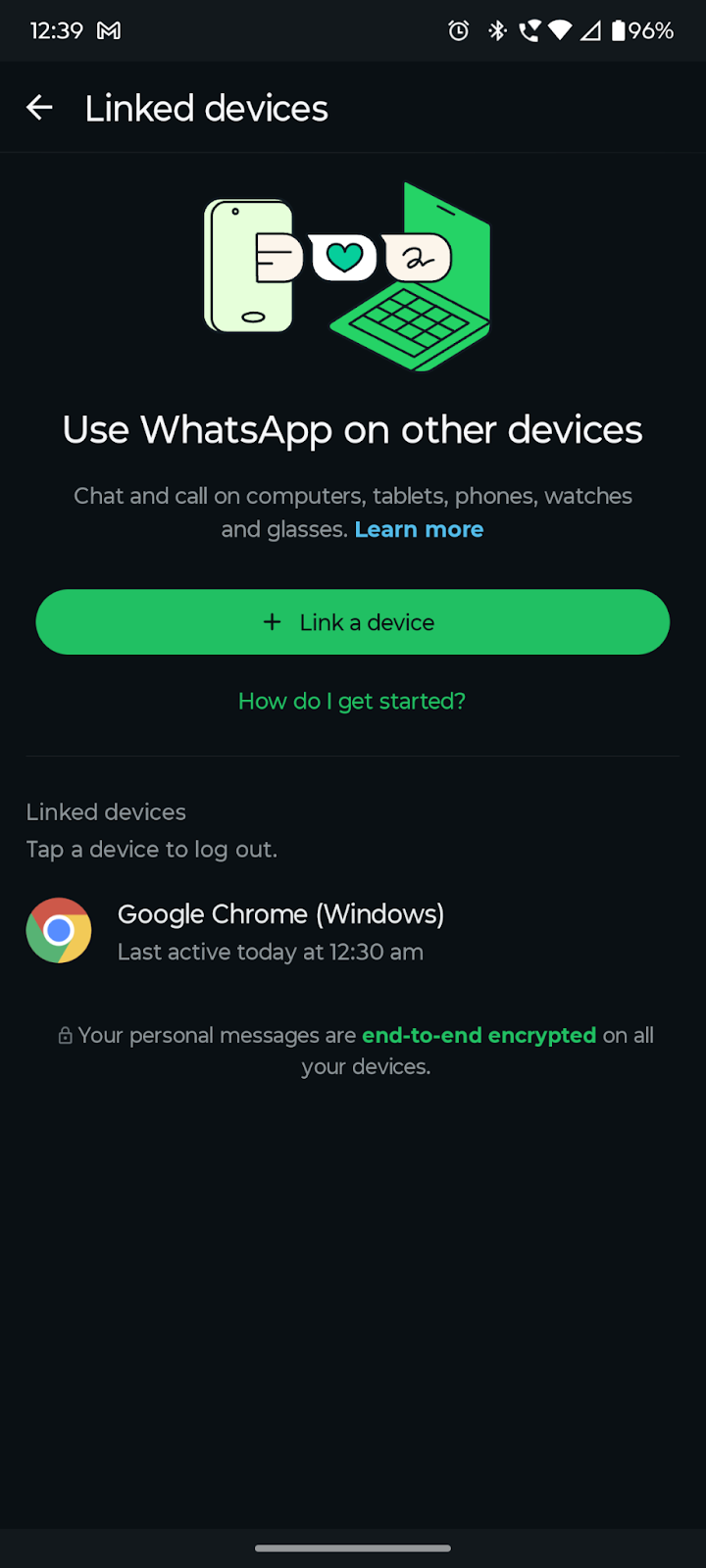
All you need to do is tap on a device you deem suspicious, and then tap on Log out.
Nowadays, hackers love silent logins. This is how it usually occurs when people look at your chats, take screenshots, or access your files without your awareness. When it feels strange, simply log out.
See All: CapCut Blocked? How to Download and Install CapCut in India (Android)
Battery Drain and Phone Heating Up
If you notice that your phone’s battery is dying faster than your calculations, it’s time you had a peek at your phone’s battery timeline. Your phone’s battery usage usually spikes when there are background monitoring apps or potential apps running in the background.
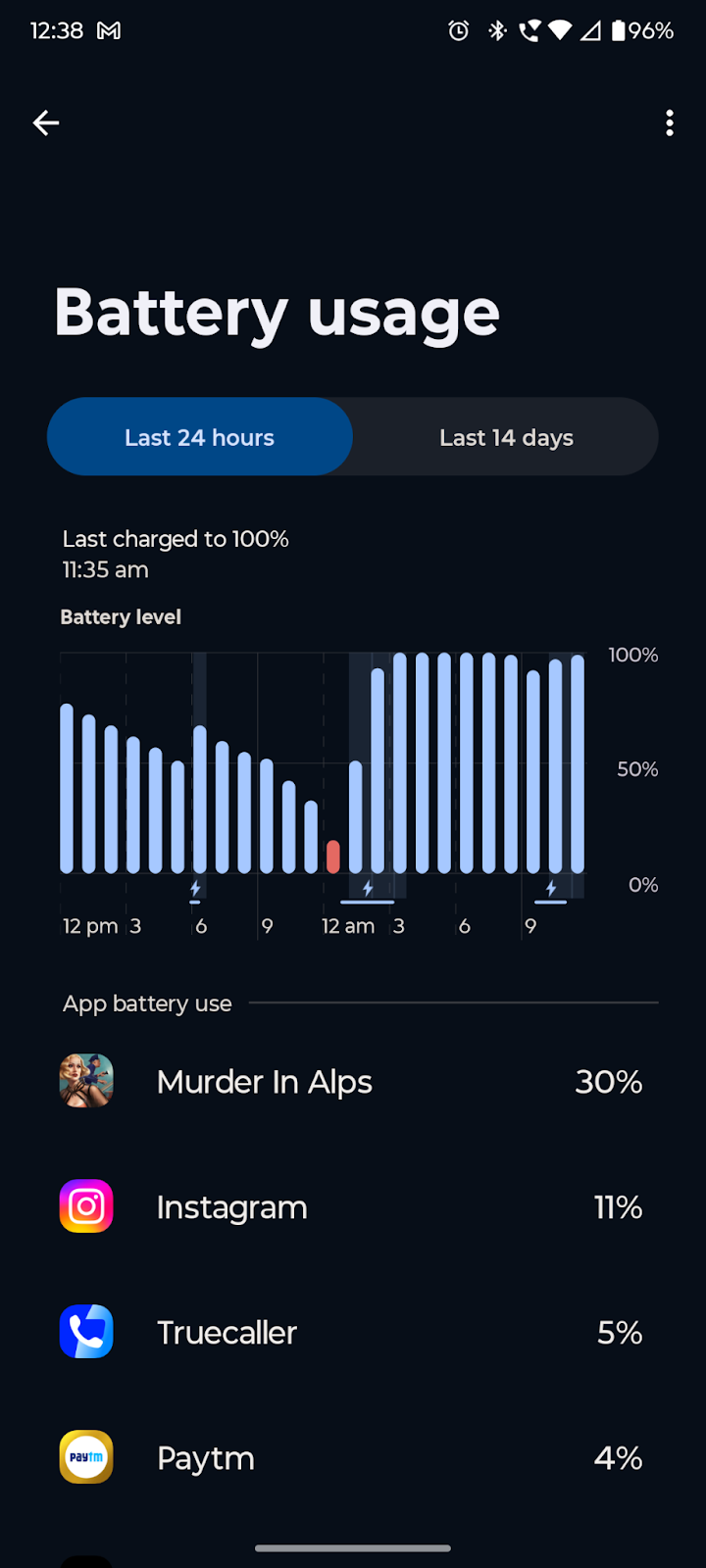
Usually, WhatsApp is not the direct target of many hackers. Rather, they just need to install it into the phone on which the app is running to replicate messages, log, and transmit the information off to them in the background.
What to Do When Your WhatsApp Account Is Hacked
If your WhatsApp account appears hacked, the first step is to log out of all the connected devices.
- Enable two-step verification and ensure you verify your phone number again.
- At the same time, change the passwords of your email account and your backup accounts.
- Enable Show security notifications in Security Settings on both Phone and Web, so that you know when there are any potential changes in your WhatsApp settings.
And if you believe that financial or sensitive information may have been exposed, talk to your bank and consider blocking SIM services temporarily.
Also See: Explore the Best Privacy-Focused Web Browsers if You Value Your Privacy
Final Word
These are some signs of your WhatsApp account being hacked. Remember that hacks do not always come with dramatic warnings. It is always best to check any suspicious behavior and then take steps to fend them off immediately. Hence, it is always best to add a reminder to check linked devices at regular intervals and enable two-factor authentication.
WhatsApp Hack: FAQs
Can WhatsApp be hacked without my SIM card?
Yes, WhatsApp can be compromised without your SIM if someone gets your verification code and access ti your linked device.
What should I do immediately if my WhatsApp is hacked?
The first thing you should be doing when your WhatsApp is hacked is to log out all linked devices and then enable two-step verification.