If you often play BGMI on a mid-range or budget smartphone, you must already know the frustration when you are mid-fight and about to pull the trigger, and your character reacts half a second late. We all have faced lagging issues in BGMI, and it can be super annoying. But the good news is that most BGMI lag is usually because of three problems. The trick is figuring out which one you’re actually dealing with so that you can work towards reducing lag in BGMI.
Why Does BGMI Lag?
So why does BGMI lag on phones, especially if you have a non-flagship phone? The key is to understand what’s actually happening under the hood.
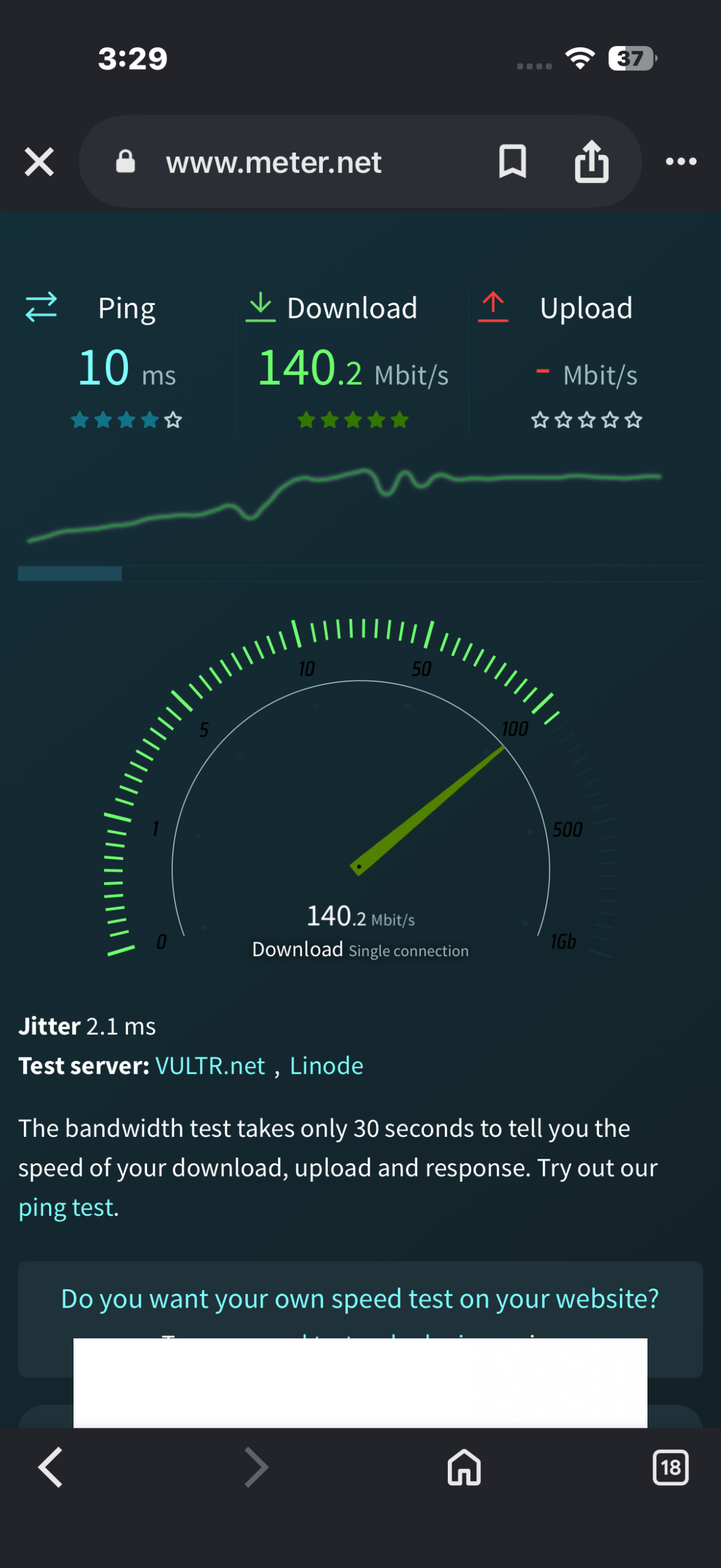
1. Network lag (ping): Your device sends an action to BGMI’s servers, waits for a response, and renders it. If your ping is above 80-100ms, that round trip is usually what you feel as lag.
To see the speed, open meter.net and check the speed.
2. Rendering lag (FPS drops): Your smartphone’s GPU can’t push frames fast enough for your chosen graphics settings. As such, the game visually stutters even with a perfect internet connection.
3. Thermal lag: This is one of the major causes of BGMI lagging, especially on budget smartphones. After 10-15 minutes of sustained load, your phone’s processor hits its thermal ceiling, and the chipset firmware deliberately throttles clock speeds to protect the hardware.
Step 1: Fix the Graphics Settings
Now, let’s face it. Non-flagship smartphone processors are not meant for Ultra HD settings. If you do that, you are bound to hit the thermal ceiling faster.
So, on your non-flagship device,
- Graphics quality: Set the graphics settings to Smooth or Balanced.
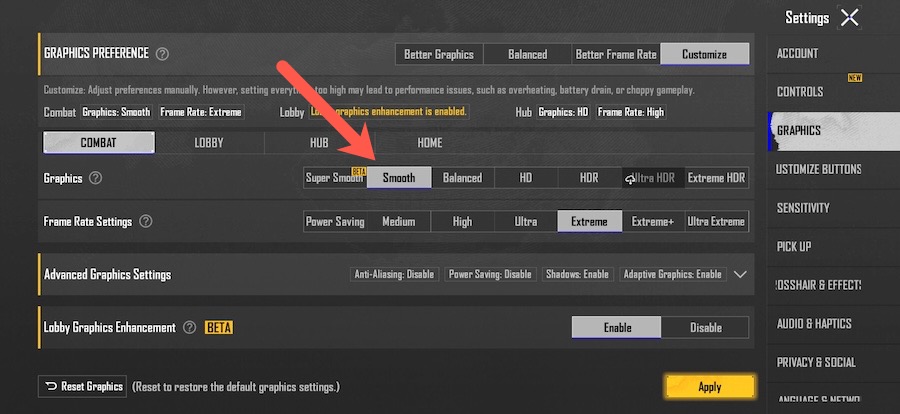
- Frame rate: Set to the highest stable option your phone offers. However, don’t force 90+ FPS. A stable 40 FPS beats an unstable 60.
- Shadows and Anti-Aliasing: Interestingly, shadows alone can cost several FPS on entry-level GPUs since they require extra render passes.
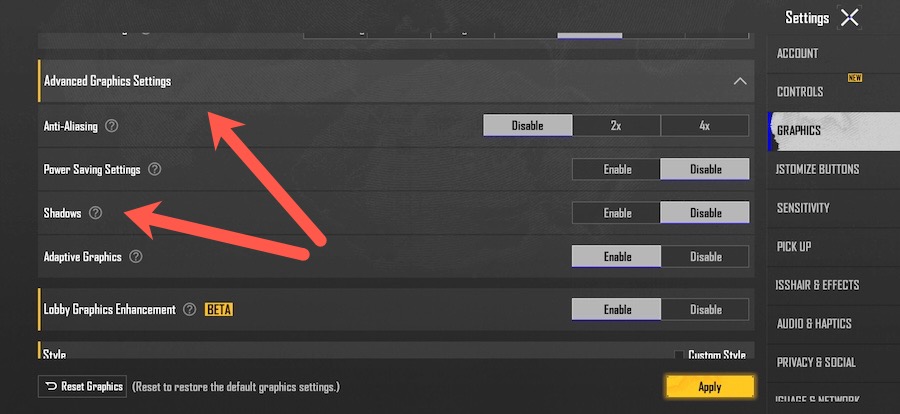
- Auto Adjust Graphics: On most phones, this setting can silently change your graphics mid-match to hit a target FPS. This may sometimes make your game feel inconsistent.
Step 2: Check the Ping
If you often play on Wi-Fi, we’d recommend switching to the 5GHz band if your router supports it. It’s usually less crowded than 2.4GHz, which means less interference from nearby networks and a more stable connection. But if you often play using mobile data, always select manually the region closest to you. This can often reduce ping.
Also, you may want to close cloud backups or file sync services that may run in the background. They quietly consume bandwidth in the background, which can lead to lag just when you need a smooth connection the most.
Step 3: Manage the Heat
Now, most of us use a smartphone cover. The key is to understand how the cover is hampering your play. So if you are playing a long session match, remove the case since plastic and silicone covers trap heat and this may lead to slowdowns. As a matter of fact, using a basic clip-on cooling fan will help solve the thermal-throttling problem to some extent.
And while we all like to play long sessions, capping sessions at 20-25 minutes during peak hours. Plus, letting your phone rest 3-4 minutes between matches also help your phone (and clock speeds) to recover.
Lastly, maintain a battery percentage between 40-80% when playing. Do note that charging while playing triggers additional power management that throttles performance.
Step 4: Clear the Clutter
Did you know that the BGMI’s resource pack also increases over time? So in case your phone has any unused HD resources and cache, you can free them up from time to time.
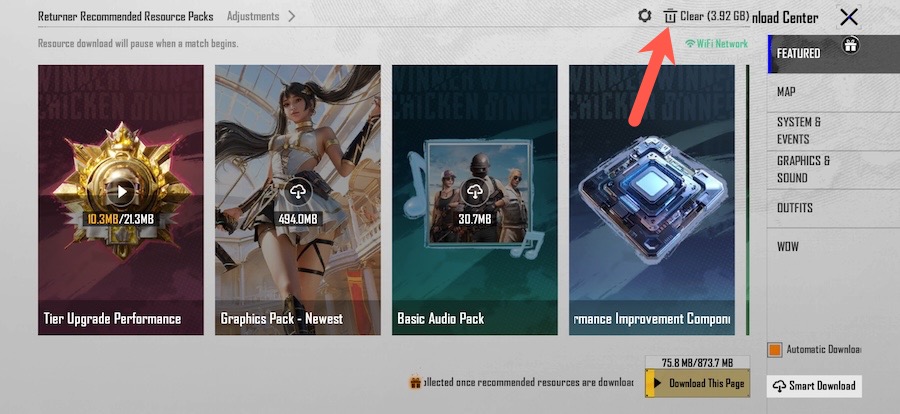
To do so, go to Downloads and tap on Clear to remove additional resources.
Here’s to Lag-free BGMI Gaming
There’s no universal best setting that magically fixes lag for everyone, because the root cause isn’t the same for every player. Before tweaking your settings, figure out why the lag happens.