
If you are someone who regularly juggles 20+ tabs and switches between multiple projects, it’s time you switched to a browser with vertical tabs. Vertical tabs not only let you shift your tab list to a clean sidebar, but they also make tab titles more readable. So if you are on a Mac, here are the best Mac browsers with vertical tabs in 2026.
Arc Browser
One of the first names that pops up when talking about Mac browsers with vertical tabs is The Browser Company’s Arc. This one not only places tabs in a collapsible left sidebar but also has a dedicated space for organizing multiple projects. In fact, it’s one of the most elegant vertical tab implementations on Mac.
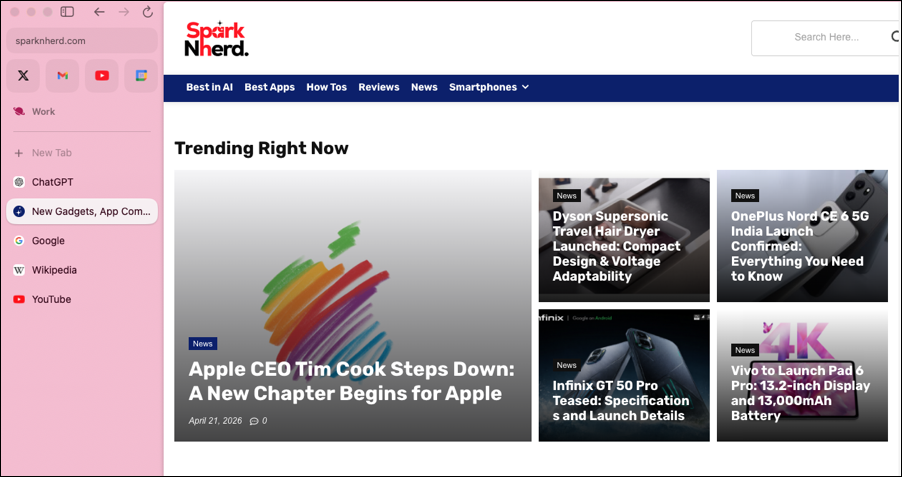
The collapsible sidebar keeps tabs organized and frees up screen real estate, and this is especially huge in MacBooks with smaller displays. At the same time, additional features like Split View, Boosts for customizing websites, and built-in notes add to the fun.
However, there’s a slight catch. The Browser Company stopped active Arc development in May 2025. While Arc still works and receives its quota of security updates, there will be no new features.
Microsoft Edge
If you are apprehensive about Arc, then your next best bet would be Microsoft Edge. This browser offers native vertical tabs along with a Collections feature to organize research better. Plus, there’s also an option for a built-in password manager and a distraction-free reader mode.
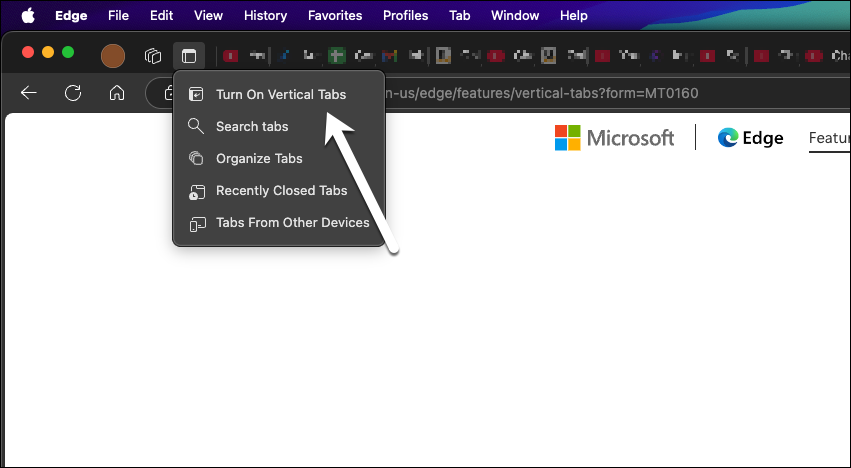
It’s built on Chromium, which means Chrome extensions work just as well. The vertical tab experience in Edge is clean, responsive, and easy to navigate.
It’s worth noting that this browser with vertical tabs also benefits from an Efficiency Mode that reduces CPU and battery consumption. This makes it a practical choice for MacBook users who can’t afford to sacrifice runtime.
Safari
Yes, the good old Safari also has vertical tabs. There’s a slight catch, though. Safari added vertical tab support via its sidebar some time ago. However, this feature is a bit hidden. All you need to do is enable it by opening the sidebar and creating a Tab Group. Yes, that’s it. All your tabs will appear vertically in the left panel.
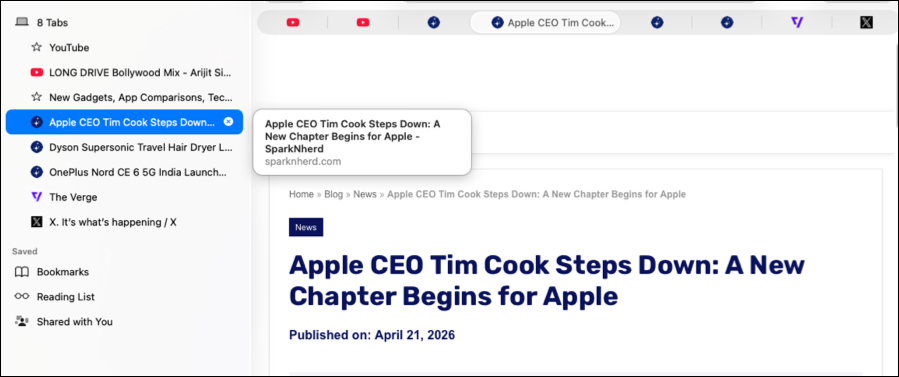
The only issue is that at the time of writing, there’s no way to hide the normal tab bar. But if you want the security that Safari provides, then this implementation is the best way forward.
Zen Browser
Zen brings the best of all worlds. This one is built on Mozilla Firefox as an open-source project. And as such, this Mac browser defaults to vertical tabs. Secondly, it is built on Firefox’s privacy-respecting Gecko engine rather than Chromium. So you can expect a whole new browser experience.

At the same time, it comes with added features like Split View and Zen Glance for link previews. Plus, Workspaces separates project contexts. That said, Zen is still in beta, so you may find the occasional rough edge. But then, it’s stable for daily use.
Which Vertical Tab Browser Should You Choose?
These were some of the best browsers for Mac with vertical tabs in 2026. If you can look beyond the sunset risk, then the Arc browser is a good choice. But if not, Zen Browser is a good way to start the journey. But if you are already using Microsoft Edge, all you need to do is enable the Vertical tab feature, and you are good to go. While Safari is good, it doesn’t give a true vertical tab workflow.
FAQs
Does Safari support vertical tabs?
No, Safari does not currently support true vertical tabs. While Apple introduced a redesigned tab system, tabs are still displayed horizontally at the top of the browser.
Is Arc Browser still available?
Yes, Arc Browser is still available to download and use, but it is no longer actively developed.
What replaced Arc browser?
Dia replaced Arc Browser. It shifts the focus from tab management to AI-driven browsing.
Will Safari get vertical tabs in the future?
There is no official confirmation from Apple yet, but given evolving browsing habits, it remains a possibility.