Google has recently rolled out a critical security patch update, Chrome 146.0.7680.75/76 for Windows/Mac and 146.0.7680.75 for Linux, addressing 29 security vulnerabilities, including two actively exploited zero-days.
Google has warned that delaying the update risks remote code execution via malicious sites. Users worldwide, especially in high-threat regions like India, must prioritize this Chrome 146 security patch amid rising cyber threats.
Also See: How to Speed Up Downloads in Google Chrome
Two Chrome Zero-Days Under Active Exploitation in 2026
Google just dropped a critical Chrome 146 update fixing CVE-2026-3909, a serious integer overflow flaw in the Skia graphics engine that can allow attackers to achieve remote code execution and deploy malicious payloads via specially crafted web pages.
But that’s not all. The update also patches a second zero-day, CVE-2026-3910, an improper implementation vulnerability in Chrome’s V8 JavaScript engine that can allow malicious scripts to escape execution constraints entirely.
These threats were spotted by Google’s Threat Analysis Group (TAG) Interestingly, this follows last month’s CVE-2026-2441 patch.
Cyber attackers use specially crafted HTML pages to bypass Chrome’s sandbox defenses, gaining access to user data or deploying spyware directly inside the browser.
Comprehensive Chrome 146 Security Overhaul: 29 Vulnerabilities Fixed
The Chrome 146 security patch goes well beyond the two zero-days. Here’s a breakdown of what’s been fixed:
- CVE-2026-3913: Critical buffer overflow in WebML that could crash your browser.
- CVE-2026-3914 & CVE-2026-3915: High-risk integer overflow vulnerabilities.
Additional use-after-free errors in Agents, WebMCP, and Extensions. In total, Google’s bug bounty program rewarded security researchers over $200,000 for responsibly disclosing these flaws, allowing Google to fix and roll out the update as fast as possible.
Note: If you use other Chromium-based browsers, such as Microsoft Edge, Brave, Opera, and Vivaldi, you should also update immeditely.
How to Update Google Chrome to Version 146 Immediately
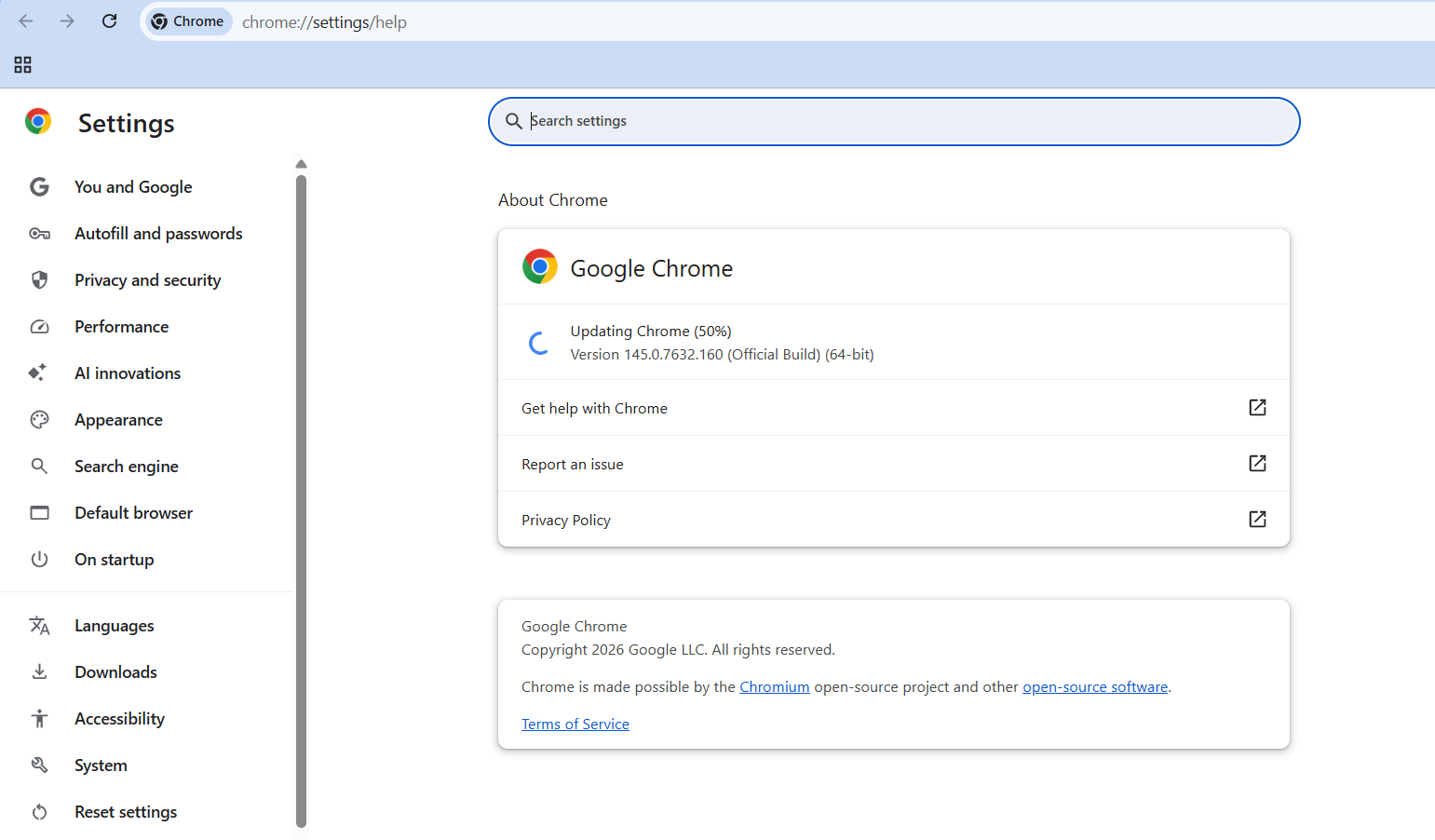
Step 1: Open Chrome, click the three-dot menu, and select Help > About Google Chrome. Chrome will auto-download the latest version (check for 146.0.7680.75+). Restart your browser.
Android users can get the update (version 146.0.7680.115) directly via the Google Play Store. Note that Chrome for iPhone and iPad is not affected by these specific vulnerabilities. Enterprise users should stage rollouts while monitoring for crashes before full deployment.
Why Skipping This Chrome Security Patch Is Dangerous
If you skip the Chrome update, then the hackers could break out of the browser’s “sandbox,” and steal your data, or hit you with ransomware. Bugs like CVE-2026-2441 let bad sites run malicious code the moment you visit.
Google Chrome powers 65% of browsers worldwide, making the attack surface enormous, particularly for users handling sensitive personal or financial information.
Layer up your protection:
- Update Chrome to 146 now
- Use a trusted ad-blocker
- Enable Google Safe Browsing (Enhanced mode)
- Avoid clicking unknown links until updated
Chrome’s Third Major Security Rush of 2026
This is Chrome’s third significant security update in 2026, following an emergency patch on March 3rd covering 10 flaws and February’s zero-day fixes. CISA has officially added both CVE-2026-3909 and CVE-2026-3910 to its Known Exploited Vulnerabilities (KEV) catalog, further underlining the urgency.
Cool new additions like the improved Web Locks API boost overall browser stability, but security remains the real priority here.
Both Google and leading cybersecurity experts agree: update Chrome now. Your online safety depends on it.
FAQs: Chrome 146 Zero-Day Update
What happens if I don’t update Google Chrome?
The update is recommended for all users to stay safe from two actively exploited zero-days, CVE-2026-3909 and CVE-2026-3910. If someone doesn’t upgrade, they are more likely to fall into the trap of hackers.
How can I check my Chrome version?
Open Chrome, click the three-dot menu > Help > About Google Chrome. You should be on version 146.0.7680.75 or higher.
Is updating Chrome to version 146 safe?
Yes, completely. This is an official Google security patch. Updating is strongly recommended by both Google and CISA.
Are other browsers like Edge or Brave affected?
Chromium-based browsers like Microsoft Edge, Brave, Opera, and Vivaldi may be affected by the same underlying vulnerabilities. Check each browser for their respective updates.