We live in a world where people like to be always connected, and well, not a day goes by without using devices like smartphones, tablets, and laptops, be it for banking, travel, or work. So imagine a situation wherein your device has run out of power, and you are in a public place. What do you do? Do you connect to the first available USB port? If yes, is it safe?
That’s when a USB data blocker comes into the picture. What does it do? read on.
What Exactly Is a USB Data Blocker?
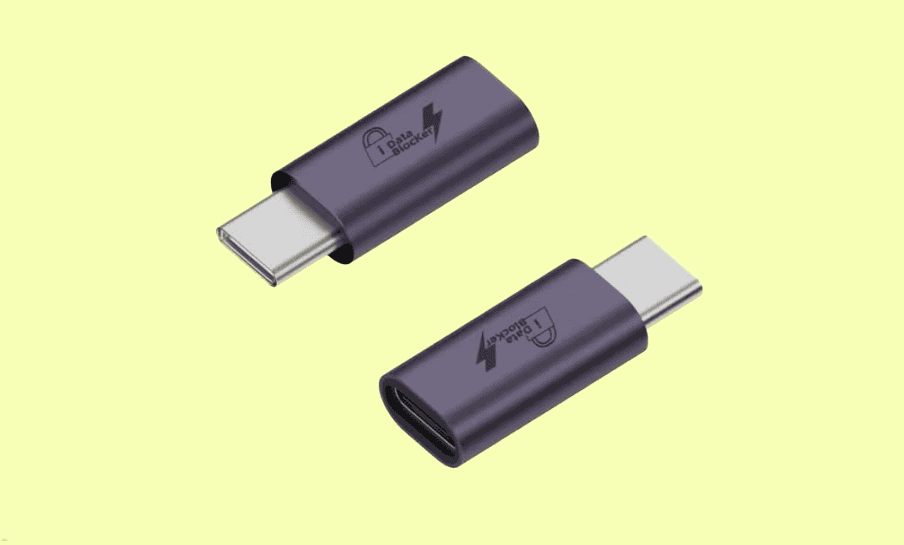
A USB data blocker is a tiny adapter that fits between your USB cable and the public charging port you are using. What is the purpose of this adapter? To protect the device and only allow electrical power to pass through for charging, and block any data transfer intended to breach your privacy.

Let me explain. A regular USB cable has several internal pins, some used for powering the device, and some are used for data transfer. So, if you connect to a port that is not safe, it can be used to access your device without your knowledge. In fact, it can also be used to infect it with some type of virus. That’s when the USB data blocker comes in. It disables the data pins and leaves only one power connection active to ensure your phone charges safely without any threat of data theft.
So, what do cybersecurity experts call this data theft or Juice Jacking? As per cybersecurity experts, stealing data through charging ports is a growing threat. The scary part? Hackers can compromise public USB ports or even cables and turn them into tools that secretly extract data or install malware when you plug in. Once your device is infected, attackers can gain access to your photos, passwords, contacts, and even financial apps.
This cyber attack is not limited to the USB ports of Android smartphones. If you are not careful, attackers will exploit permissions for peripherals (via AOAP or Android Open Accessory Protocol) of peripherals such as mice or keyboards. Attackers can then begin hijacking system input through ADB (or Android Debug Bridge), which can simulate user input and change the USB mode to allow data transfer without your permission.
The scary part is that you would not even know it happened. The charging process looks completely normal. That is why the FBI and several cybersecurity agencies have issued warnings about using public USB charging stations without protection.
Why You Should Get One Today
So, if you are a frequent traveler or work out of a public workspace, you will need this small but highly useful privacy protector. This digital lock not only ensures your phone is not silently giving away your data, but it is also small and inexpensive.
What’s best is that it works with any device, irrespective of whether you are using an Android, iPhone, or laptop.
Things to Look for When Buying a USB Data Blocker
Not all USB data blockers are created equal. When choosing one, look for these features:
- Build Quality: A sturdy metal or durable plastic casing lasts longer and withstands frequent plugging and unplugging.
- Fast Charging Support: Some cheaper models may slow down charging. Choose one that supports at least 2.4A or USB 3.0 for fast charging.
- Compact Design: A slim, lightweight model fits easily on your keychain or in your travel pouch.
Amazon India has a couple of great and reliable USB data blockers, such as the PortaPow USB Data Blocker or the ones from BUISAMG.
Key Takeaways
With the trend of emerging cybersecurity threats, it is important to be careful. The USB data blocker is an adapter that you will not need often. However, plugging in a device when you are in a public space can save you from data theft. So why not be safe and take steps toward protecting ourselves?
So the next time you are about to plug into a public charging port, pause for a second. Place a USB data blocker between your device and the port.