It’s no secret that AI is taking over every industry, and not everyone is ready to totally adapt to the AI interface. On that note, Mozilla Firefox is set to introduce a new feature that would allow users to disable all AI functionalities with a single toggle.
The so-called AI Kill Switch disables all the AI functionalities, which is a move that addresses privacy concerns amid browsers’ push into AI integration.
See Also: Explore the Best Privacy-Focused Web Browsers if You Value Your Privacy
Feature Details
Firefox 148 will be released on February 24, 2026. There is a dedicated section in desktop browser settings known as “AI Controls”.
This new AI Controls panel helps in gathering all toggles in one single spot and will allow switching off features like automatic webpage translation, PDF alt-text creation, AI-suggested tab groups, link previews, and the sidebar for chatbots such as ChatGPT and Gemini.
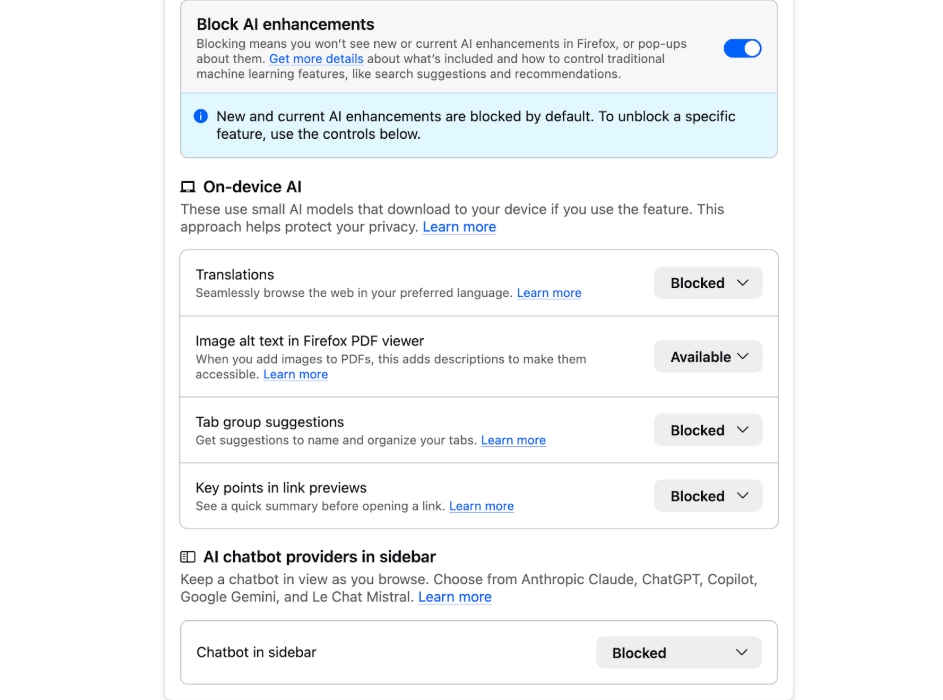
Other than that, the master switch helps in blocking all current and future generative AI enhancements, which prevents pop-ups or hidden activations, while individual opt-ins remain available for those who want them.
Mozilla guarantees that the AI features work right on your device without sending data to servers, unless you choose to use outside services like ChatGPT.
See Also: 5 Best Online PDF Editors to Annotate and Edit PDFs
Background
After taking charge as Mozilla’s new CEO, Anthony Enzor-DeMeo announced in December 2025 that they planned to evolve Firefox into a modern AI browser. CEO Enzor-DMeo had emphasized user choice and control around AI.
Other than that, test versions of Firefox already let early users try the new controls and turn off all AI features completely. This helps address worries about unwanted AI, similar to complaints from 2024 when Mozilla made data collection opt-out by default.
User Impact
If you prefer privacy, this Kill Switch is a good AI-free option. This move marks a step towards an AI-free browsing experience, especially in a world where other browsers are competing to stay relevant in an AI-filled web world. At the same time, Firefox is giving the control back to the user’s hands.
This approach appeals to people nervous about tech everywhere, which could help Firefox gain more fans as privacy laws tighten worldwide.
Firefox 148 Update: FAQs
What is the Firefox 148 update?
The Firefox 148 update includes a panel which allows users to switch of the AI features while using Mozilla Firefox.
How do I disable AI features in Firefox 148?
Access the browser’s Settings section, which will redirect you to a page to disable AI features.
Is Firefox still safe to use without AI features?
Yes. Disabling AI features does not affect Firefox’s core privacy protections or regular browsing performance.